
CCMS Resources & Learning Center

Structured learning programs for every role — from content authors to system administrators
Maximize your CCMS investment with expert-led training programs designed for every role in your content organization. Whether you’re onboarding new authors, upskilling administrators, or introducing subject-matter experts to structured authoring, our training team delivers the knowledge your team needs to succeed.
GlobalLink CCMS University
We understand the learning curve that comes with understanding technology. We also understand that you have options when it comes to how you spend your money. Sometimes, the product isn’t as important as the service that comes with it.
The relationship between a company and its customers is a long-term commitment that goes both ways. When you invest in our product, we invest right back in you through CCMS training and webinar courses — making sure you receive all the support you need to succeed.


Start with the basics in the crash course for content management
You read about content management in every technology industry publication. It is the term used to represent a broad scope of systems. And now your boss has charged you with researching component content management systems (CCMSs) for your organization, and you do not have the first clue on how to look for and evaluate a component content management system. You need a component content management system class!
You must start at the beginning and cut through all of the technical jargon. You need an easy content management course to explain what it is, who needs a CCMS, and how a CCMS benefits an enterprise
This Crash Course for Content Management is a free, self-paced tool that provides high-level, simple content management training so you can learn the basics quickly to jumpstart your CCMS research.
Let's start with the basics.
Contact us for further information about more in-depth training in content management.
Organizations that implement content management systems before their content is ready often end up using the systems as expensive file servers with version control - making it difficult to successfully implement the systems. Preparing your content properly beforehand can ensure that the content management system is used to its best capacity and enable your organization to achieve an ROI in a year or less.
Note: Some organizations tackle this process themselves, while others leverage an industry consultant to help them. Several steps can be performed simultaneously to speed the implementation process.
Step 1: Analyze Content
Examine the documents (internal or external) that your department works on. For each document, ask yourself questions such as:
- What is this document? What do I call it?
- Does it have pieces? How are the pieces used?
- Are some pieces used in several documents? Could they be?
Step 2: Model Content
Most documents have an inherent structure...i.e., a book must contain multiple chapters, or a glossary is always composed of at least a term and a definition. This structure, or content model, must be spelled out explicitly in a DTD (Document Type Definition) or XML schema.
- Does your content fit into an existing model, such as DocBook or DITA? Some organizations find it easier to use an existing model if the structure truly fits their content.
- If your content does not fit an existing model, consider creating your own customized DTD. Be sure to do research and use best practices or engage a consultant for help.


Step 3: Choose a Pilot Project
Many CMS experts agree that it is imperative that organizations initially work with a single project as a pilot to trouble-shoot start-up issues before implementing a content management system across an entire department or enterprise. When choosing a pilot project, ask yourself:
- Which documents are most representative of the content we someday want to manage in the system?
- Which projects can move forward in the content management system without impacting the schedule for ongoing deliveries?
- Which documents can realize the most immediate benefits from content reuse?
Step 4: Choose Editorial Software
Before you can work with structured content, you need to choose an editorial software program.
- Choose a tool that is easy to use. Make sure it contains the functionality you need in your editorial process and tools to help you convert legacy content.
- Make sure the editor you choose integrates with your content management system.
Step 5: Convert Content to a Structured Environment
Typically, converting your content to a structured environment requires three steps:
- Prioritize your content so that you convert only the content that is critical to your business needs.
- Map existing styles and formats to structured elements using a conversion table (conversion tables are offered with many editorial software programs).
- Clean up inconsistencies and verify that the content model you have chosen works well with your content.
You'll also need to consider the following:
- Does all of your current and legacy content need to be converted?
- If not, how far back should you go?
- What will your timeframe be to complete the conversion process?
Click here for more tips to help you ready your content for data conversion.
Now you are ready to go live with your pilot project!
Top ccms features
The top component content management systems (CCMS) sport many advanced capabilities to help writers manage and publish XML content. You need to narrow your list of tools down to the leading CCMSs that have the features that will address your pain points and make your organization most productive, therefore saving you time and money. But, what are the most valuable features to hone in on when shopping for the best CMS?
A content management system can help you meet the technical, workflow, regulatory, and other unique challenges your organization faces. Determining the optimal set of features for your content management system will require careful consideration of a number of factors. The specifics of your industry in general will play a large part in establishing your priorities.
A content management system can help communications companies and electronics manufacturers organize and store highly technical content, such as help documents. It can help healthcare organizations make information accessible to auditors and end users, while remaining in compliance with CFR Title 21 guidelines.
Other industries that can benefit from specific CCMS features include finance, government, travel and transportation, and more. Keep browsing our website to learn more about how our sophisticated CCMS platforms are helping prominent clients in a wide range of sectors.
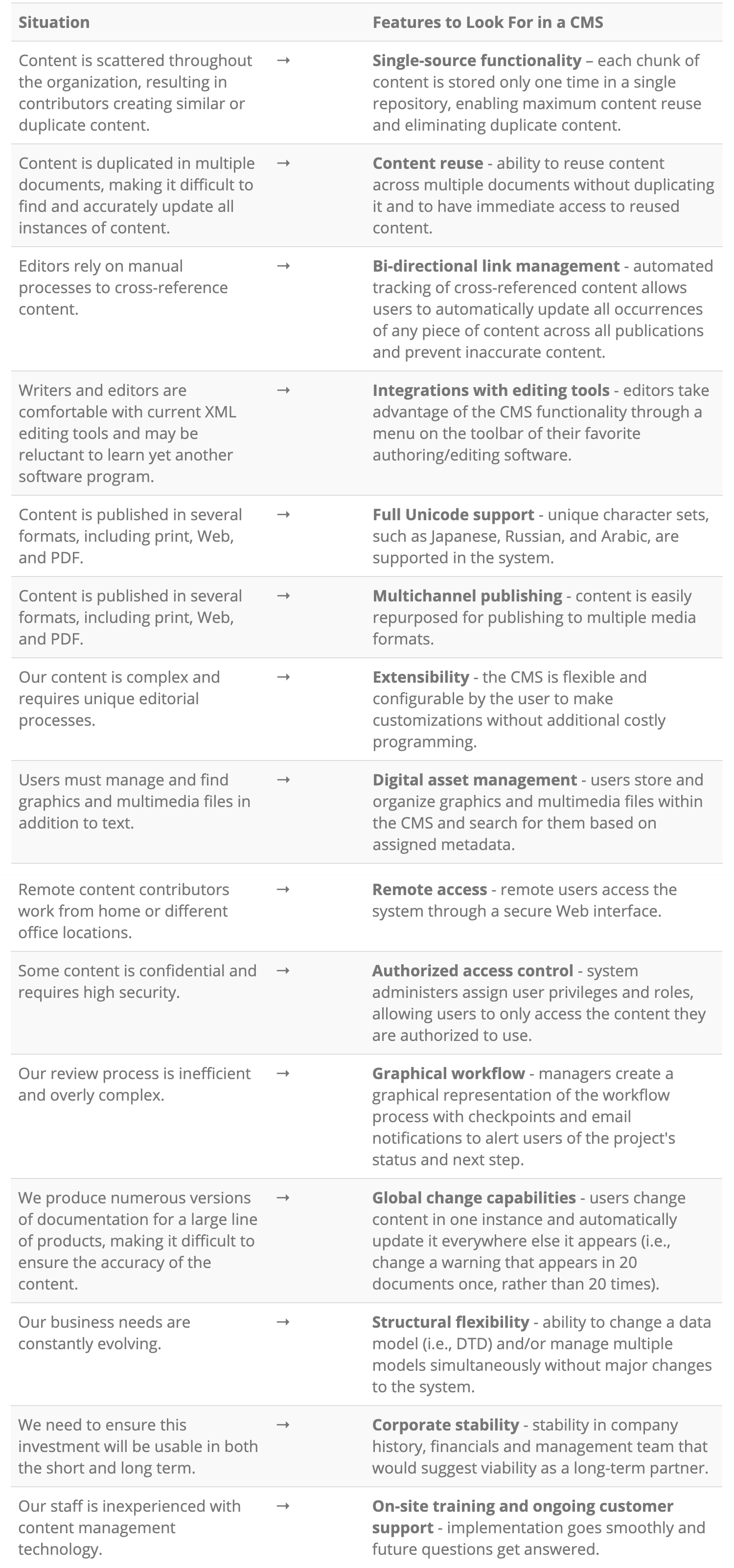
Knowing what a CCMS can and can’t do is the first step in determining the best system for your organization. Below is a list of situations that writers and technical communications managers typically encounter and the corresponding features that can be found in the best content management systems that improve those issues. Pick the ones that apply to your organization and make a list of the corresponding features to look for. Then, ask these top tier CCMS vendors to demonstrate the features for you.
What to Look For in a Component Content Management System
Are you still trying to figure out the next step towards a content management solution for your organization? Read on to find out how some Vasont users got started in content management.
LSI Corporation: In Their Own Words
LSI Corporation (LSI) is the recognized leader in the modular, high-performance disk storage systems industry. A more than 20-year history of researching, developing, and manufacturing innovative storage solutions has positioned LSI as the partner of choice for some of the largest information technology vendors and resellers in the world.
Challenges:
"LSI's problem, a problem we perhaps share with you, is that we are a cost center. Despite the wide range of talents our team regularly displays, our contributions to LSI's bottom line are limited because, while we generate a significant amount of value, we do not generate a corresponding amount of revenue. By making our information development processes more economical, creating new markets for our information, and providing customized information products and services, we moved from a cost center to a revenue-generating organization and realize an economic return on LSIL's investment in our team."
Starting Point:
"Our first step was to understand our starting point. To help us gain insights into our team structure, processes, strengths, and opportunities, we asked a leading industry consultant to complete an assessment of LSI. They helped us understand what we were already doing well, and they provided us recommendations about what we would need to do differently to manage the changes we were effecting and accomplish the objectives we had established. The consultant's report provided detailed recommendations on how we could take our processes to the next level.
Vasont Systems provides a CMS that met all the criteria we identified, and Vasont Systems helped us identify tool-related questions that we should have been asking but were not yet CMS-savvy enough to understand. Vasont Systems provided us a staged implementation of a scalable CMS that interfaces with our information development application and database to help us save a significant amount of time and money. The implementation learning curve has been very manageable, due in large part to Vasont Systems' onsite consulting and role-based training for our team members, as well as to Vasont Systems' responsive support team. These factors have been critical to the successes LSI has accomplished to date. Some of LSI's most significant advances during our implementation have resulted from mapping specific project goals directly to our tool-selection criteria. We evaluated a number of vendors and systems while we developed our strategy, and selecting a system that has meshed so well with our people and processes has helped make the initial phases of our implementation successful."
Medtronic Neuromodulation
Headquartered in Minneapolis, MN, Medtronic is the world's leading medical technology company, providing lifelong solutions for people with chronic disease. Medtronic's mission is to alleviate pain, restore health, and extend life for millions of people around the world. With deep roots in the treatment of heart disease, Medtronic now provides a wide range of products and therapies in Cardiac Rhythm Management, Cardiac Surgery, Vascular, Neurological, Diabetes, Spinal, and Navigation. Every six seconds, somewhere in the world, a person's life is saved or improved by a Medtronic product or therapy.
Challenges:
Medtronic realized that their content creation process for their publications was inefficient, cumbersome, and costly. They had limited content reuse in place, which gave them little control over the changes made to their content because they had no way to track the changes. There was no automation for repetitive editorial activities, so creating product information was a manually intensive process. They repeatedly sent "same/like" content to review and translate, an inefficient and costly process. When they analyzed the department's annual budget (65% in English content authoring/editing, 5% in English document composition, and 30% in translation and multilingual composition), it became clear where to focus the solution in order to gain significant savings - content management.
Starting Point:
They identified three choices to get started in content management:
- Outsource - this option was costly and risky; Medtronic would lose control.
- Build proprietary system - this option was also costly and would imprison Medtronic into one particular system technology.
- Buy midrange off-the-shelf and open source technology - a better option; using existing software and expertise and buying only what they needed was more versatile/changeable and easier to grow into, plan, and budget.
They purchased the Vasont content management system because it:
- Optimizes content reuse to automate control and tracking and reduce review and translations cycle load;
- Optimizes and automates authoring tasks;
- Provides a fast-track implementation to support key business initiatives; and
- Supports report leveraging for business decision-making.
Tools to get started
Please sign in or register to receive access to the ROI Calculator and the RFI and RFP Templates. Tell us where you stand so we can point you in the right direction to get started in content management.
Developing a plan for your content management initiative is essential to achieving success. Besides being a persuasive document to show your management team that content management is a solid investment, it also forces your team and your chosen vendor to lay out all the details necessary to meet your content management goals.
While the exact format and content of your plan will vary, there are some basic points that you should address. Use the outline below to structure your proposed plan and fill in information for your situation.
Executive Summary
Provide a brief description of the business problem (Ex.: "Our editorial department wastes too much time creating duplicate content, slowing down the production process."). Then provide a short description of the solution (Ex.: "A single-source content management system will eliminate the creation of duplicate content by enabling robust content reuse, thus freeing authors to focus on creating new content and improving production time."). Also, provide a summary of the estimated costs, projected savings, and new revenue streams.
Detailed Plan
I. Outline the current situation
- A. What is the current business problem?
- B. How much is it costing the company?
- C. If the problem is not resolved, how much will it cost the company in the future?
II. Description of the project
- A. What current problems will the project solve?
- B. List goals, both firm and general expectations.
- C. Define the projected measures of success/milestones in quantifiable terms, if possible (summarize here and provide detail in III.I.i).
III. Logistics of the project
- A. Locations/divisions
i. What locations/divisions will the project initially affect?
ii. What are the potential expansion sites when the project is successful?
- B. Technology requirements
i. What additional software/hardware will you need?
ii. What technologies and corresponding support fees can be eliminated?
- C. Staffing requirements
i. Identify by title exactly who will be the key players in the project (i.e., administrator).
ii. Who will have access to the system?
iii. What additional positions will be needed?
iv. Which current positions do you predict will be eliminated or reassigned?
- D. Other resources required
i. What will you need?
ii. What can you eliminate?
- E. Training
i. Who will be involved in the training?
ii. Who will provide the training?
iii. How long will it take?
iv. When will it happen?
v. How often will it occur?
- F. Support
i. Who will need support?
ii. Who will provide support and how?
- G. Security
i. How will you determine and control who has access to each content collection?
ii. How often will access be reassessed?
iii. What other security measures will be in place?
- H. Continuity
i. How does this project fit into your organization's overall business continuity strategy?
ii. If you organization doesn't have one, how will you protect your content from unforeseen natural or technical circumstances?
- I. Milestones/metrics
i. What are your milestones?
ii. When do you anticipate meeting them?
iii. How will you measure them?
- J. Quality assurance
i. How often will quality be assessed?
ii. Who will assess it and how?
iii. Who will ultimately determine what changes will be made, if needed?
- K. Deliverables
i. What deliverables do you expect to produce and how often?
ii. What new deliverables/revenue streams do you anticipate?
IV. Financial aspects of the project
- A. What are the costs involved to implement the project?
- B. What are the payment options?
- C. What are the projected costs for the future (support, customizations, additional seats)?
i. Detail by month for the first year; detail by quarters for the second and third years.
- D. What are the projected time and cost savings?
- E. What assumptions did you use as a basis for your projections?
(Need help coming up with numbers? See actual results from our Vasont client base and use them as a basis for savings estimates.)
V. Supporting documents
- A. If available, attach copies of vendor RFIs or RFPs, agreements, licenses, and other legal documents.
Learning a new software program can be intimidating to some people. For the most part, people are creatures of habit and change can make them uncomfortable. So, as you prepare to implement a content management system, there are a few things you can do to prepare and excite your staff. First, be aware of some common concerns that your staff may have:
- Fear of Change: People like the status quo. New technology means a new learning curve while established processes allow staff members to stay in their comfort zone.
- Loss of Ownership: When switching from an existing editorial process to a content management system, some staff members - particularly those who have never used a system - may perceive a loss of ownership. A writer who has been in charge of the same manual for many years may feel threatened by the move to a content management system because all of the content will be stored in a central repository and reused or repurposed by staff members as needed.
- Learning Curve: Learning how to use a new content management system often requires users to learn new writing concepts. Most people tend to think of their content as files that live in folders on a network or hard drive. When a content management system is in use, suddenly those files become much smaller chunks of reusable information and the concept of files and folders becomes obsolete. Users must learn to think of their content in a new and different way.
Steps to Prepare and Excite Your Staff:
- Before and during the implementation process, hold regular meetings to keep the staff informed and involved in the process.
- Set goals and milestones throughout the process and congratulate the team as each goal is met.
- Encourage feedback and take the time to listen and respond.
- Always be prepared to explain why the content management system is being implemented and how it will benefit your organization and your team members.
- Be sure to take full advantage of the training, data analysis, and technical support services offered by the vendor to ensure the implementation process goes as smoothly as possible.
- Set a realistic timeline - taking into account the system's implementation process, content conversion, and staff members' learning progress.
After implementation, use one project as a "pilot project" to identify potential weak points in new skills or workflow processes.
A guide to sources, recommendations, and opinions on content management systems
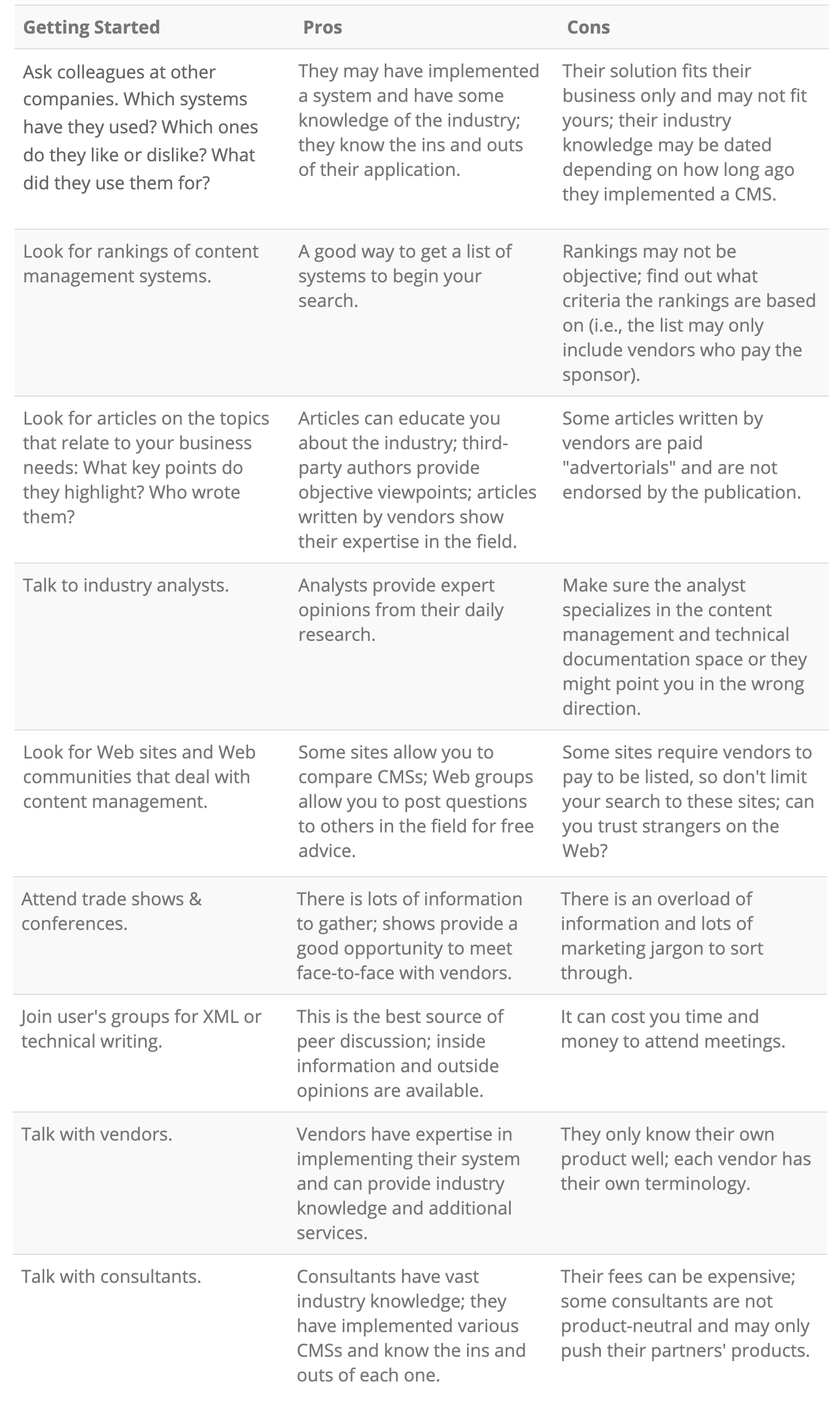
Searching for a content management system can be an overwhelming task because there are many systems on the market that generically call themselves "content management systems," but have varying functionality. With so many choices, where do you begin your search?
This list outlines the pros and cons of several research methods so that you can decide which methods are best for your search. To be most effective, choose several sources of information to find the right content management system to fit your needs.
Narrowing Your List of Vendors:
- Review the vendors’ Web sites in detail - Web sites are a great way to gather information at your leisure.
- Read white papers - White papers give you a good idea of each vendor's unique approach to content management and technology development.
- Read case studies - Does the vendor have case studies of organizations like yours? Do they address similar issues?
- Put out a Request for Information (RFI) - Weed out vendors who don't meet your needs by requesting basic information from them prior to any demos or involved sales cycles.
When you have narrowed your list to approximately three or four vendors, then submit detailed RFPs (Requests for Proposal) and request product demonstrations to get down to the details of each system's capabilities.
The following educational resources are available for purchase from our partners and business associates:
Practical DITA
By Julio Vazquez - This book presents a practical approach to creating information using the Darwinian Information Typing Architecture (DITA). It covers everything from planning the project to writing the topics that comprise an information set. The second edition contains information about the DITA 1.2 features.
Virtual Collaborative Writing in the Workplace: Computer-Mediated Communication Technologies and Processes
By Beth L. Hewett and Charlotte Robidoux, eds. - This book investigates the use of computer-mediated communication technologies, including everything from instant messaging and e-mail to interaction on Web pages, Webcasts, and graphical user interfaces, to facilitate effective interdependent collaboration in writing projects. This book focuses on the type of writing that typically occurs in virtual workplace settings, such as academic institutions, private and for-profit industry, and the government, in which the purpose of the writing is to convey information or argue a position rather than to socialize or entertain.
Managing Enterprise Content: A Unified Content Strategy
By Ann Rockley - This book provides the concepts, strategies, guidelines, processes, and technological options that will prepare you to meet the increasing demands of creating, managing, and distributing content.
DITA 101: Fundamentals of DITA for Authors and Managers
By Ann Rockley, Steve Manning, and Charles Cooper with Mark Lewis - DITA 101 is designed for authors and managers. The Rockley Group has taken years of experience helping organizations to move to DITA and distilled it in an easy to read and understand format.
Content Management for Dynamic Web Delivery
By JoAnn Hackos - With Content Management for Dynamic Web Delivery learn how to successfully manage Web content to achieve a competitive edge. Using the content-management strategy that she developed for companies such as Nortel, Motorola, Cisco, and others, JoAnn Hackos walks readers through the stages of effective Web content management.
Information Development: Managing Your Documentation Projects, Portfolio, and People
By JoAnn Hackos - The 1994 best-selling classic Managing Your Documentation Projects set the industry standard for technical documentation. However, since then, much has changed in the world of information development. With this new title, JoAnn Hackos looks beyond the structured project of the 1980s and 1990s. In 2006, she focuses on the rapidly changing projects of the 21st century and addresses how to introduce agile information development without neglecting the central focus of planning information design and development around the needs of information users.
Standards for Online Communication
By JoAnn Hackos and Dawn Stevens - Standards for Online Communication gives you guidelines for how to place information online in your company. It provides both a design and development process and a set of guidelines for the Internet, intranets, and help systems for designers and authors who need to create effective electronic information.
User and Task Analysis for Interface Design
By JoAnn Hackos and Ginny Redish - Designing an effective interface doesn't happen by chance. Good design happens only when designers understand who will be using their product, what the users are trying to accomplish, and the circumstances under which users must work. In User and Task Analysis for Interface Design, JoAnn Hackos and Ginny Redish share their experiences in gathering this information directly from users and then applying what is learned to the difficult task of interface design.
Introduction to DITA 2nd Edition
By JoAnn Hackos - This new 2011 edition of the bestselling Introduction to DITA includes DITA 1.2 mechanisms, including keyref, conkeyref, constraint mechanism, and more information to bring DITA users up to date. The tutorial lessons guide you step-by-step through the learning process from developing information topics and maps through content reuse mechanisms and modifying the DITA environment to better meet your needs.
FrameMaker: A Hands-On Guide to Creating DITA Compliant Documents
(with tutorials) by Bernard Aschwanden and Jacquie (Heys) Samuels - This innovative book provides a combination of technical information related to using FrameMaker to build DITA-compliant content with detailed, step-by-step tutorials. The interactive tutorials guide even the most novice user through the steps required to learn how to create content including tasks, concepts, references and even maps. Every aspect of creating content from the basics of the software application and use of the structured interface through to the development and publishing of maps to online help, HTML and even PDF formats is addressed.
XMetaL: A Hands-On Guide to Creating DITA Compliant Documents
(with tutorials) by Bernard Aschwanden and Jacquie (Heys) Samuels - Learn to use JustSystems XMetaL Author to create DITA-compliant content in an easy to use, hands-on fashion with guided tutorials from Certified Technical Trainers! This innovative book provides a combination of technical information related to using XMetaL Author to build DITA-compliant content with detailed, step-by-step tutorials. The interactive tutorials guide even the most novice user through the steps required to learn how to create content including tasks, concepts, references and even maps. Every aspect of creating content from the basics of the software application and use of the structured interface through to the development and publishing of maps to online help, HTML and even PDF formats is addressed.
Content is the ingredients used to create a publication. Think of your publication as a recipe...like a recipe for pizza. There are many ingredients that make up a pizza. There's dough, tomato sauce, cheese, and toppings, like pepperoni and other meats and vegetables.
Just as ingredients make a pizza, content makes a publication. For printed material such as books, reference and training materials, instruction manuals, user's guides, and business documents, content consists of text and graphics. For electronic publications such as Web sites, e-learning programs or e-books, content includes not only text and graphics, but may also include sound and video clips.
Going back to our pizza example, when you mix the right ingredients, you can make a tasty pizza. Likewise, mixing the right pieces of content allows you to cook up a savory publication that will satisfy the appetite of any reader.
Contact us for further information about more in-depth training in content management.
To identify content for delivery to multiple publishing channels, it is necessary to label each piece of content with a "tag." Standard tagging schemes have been developed to make the content "machine-readable," and these universal tagging sets are referred to as markup languages. Examples of markup languages include XML (eXtensible Markup Language), SGML (Standard Generalized Markup Language), and HTML (HyperText Markup Language). Tagging content with different markup languages allows it to be delivered and properly translated to print products (XML), Web sites (HTML), wireless products (WML), and other media channels.
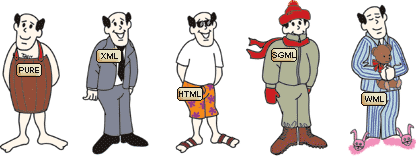
Think of tagging schemes as the clothing of the content, with content being a man. This means that content in its purest form (no tagging) would equate to a man with no clothes. In his "purest form" (naked), the man can go anywhere he wants, but he would not be comfortable, and he would get a lot of stares!
So, to accommodate his different destinations, he needs different outfits. If the man wants to go swimming, he puts on his swimsuit. When he wants to go skiing, he puts on his snowsuit, hat, and gloves. If he goes out for a nice dinner, he wears his suit and tie. And when he goes to bed, he puts on his pajamas. The man changes his outfit to accommodate his activities. In a similar way, content changes its outfits (tagging) to suit its destination (Web, print, wireless, etc.).
To learn more about tagging, read The ABCs of Structured Content [PDF].
Contact us for further information about more in-depth training in content management.
Organizations need a component content management system if they:
- Use the same content over and over again in one publication (i.e., a warning in an instruction manual may be used 10 times within that manual).
- Use the same content in more than one publication or document (i.e., a part number and description in a parts catalog may also be used in the user's guide).
- Publish their content to more than one media channel (i.e., the content in a printed instruction manual that ships with the product may also be used in the online help information).
- Publish their content in multiple languages.
The types of publications that these organizations produce might include:
- Technical documentation (parts catalogs, software documentation, user manuals)
- Reference materials (encyclopedias, dictionaries, standards guides)
- Testing and training materials (e-learning programs, testing booklets)
- Marketing and educational materials (packaging, promotional flyers and ads, brochures)
Read more about how content management can apply to various industries.
Contact us for further information about more in-depth training in content management.
“Content” is a broad term that encompasses business documents, technical manuals, marketing materials, and a wide range of other written and audiovisual data. How your organization stores, manages, and edits this data plays an important role in your productivity. Everyone benefits when your team members have tools that help them share and collaborate more effectively, reduce duplication of effort, and get the information they need quickly.
In short, component content management systems (CCMS) make your content smarter and more powerful. Because content is stored only one time no matter how many times it is used, the system can track everything that happens to it. And editors only have to handle the content one time while the changes are made globally within and across all documents.
Organizations in any industry will see the benefits of an effective component content management system almost immediately. Technology companies, healthcare providers, government contractors, and other businesses can all use a CCMS to streamline their workflows, maintain regulatory compliance, and improve overall quality control, among other benefits.
If your organization handles a diverse selection of content such as instructional videos, user guides, or product labelling, has to translate materials for international markets, or has other specific content-related challenges, a CCMS is an essential tool that will help you work more efficiently and effectively.
Below is a list of benefits a CCMS will provide to an organization.
Read more about how the Vasont CCMS has benefited some of its clients.
Contact us for further information about more in-depth training in content management.
These programs only store content as documents. So, the content isn't smart. It doesn't know where it has been duplicated or changed. It doesn't know if it has been delivered to one media channel or more. It is flat content that is time-consuming to find, update, and manage.
With a component content management system, content is intelligent. It knows all about itself and every version of it that ever existed. It knows where it is and where it's been. It knows to whom it's related. It keeps itself accurate. This makes it easy to manage.
Let's look at two scenarios for a technical documentation example. Suppose you produce user guides for 10 models of DVD players. Within these guides, an assembly instruction says, "Plug Part A into Part B." Due to some reported malfunctions, the manufacturing department changes the assembly instruction to: "Plug Part A into Part C. WARNING: If Part A is plugged into Part B, it will cause an electrical shock." You must now update all 10 user guides with this revised instruction.
SCENARIO 1: Content is stored as separate documents in a word processing, spreadsheet, or typesetting program. To make this update, you would have to search 10 different documents and replace the old instruction with the new one. This would require either the manual process of reading each and every user guide to find the instruction, or relying on a "search" command and hoping it found all occurrences of this instruction. But what if one is missed because it was typed differently in one document? It could result in a customer getting injured!
SCENARIO 2: Content is managed in a component content management system. With a component content management system, that instruction would be stored one time in the system and reused in the other nine user guides. So when one instance is updated, the system would flag the nine other instances and make a global change instantaneously in every guide, saving the editor hours of time. This is the power of single sourcing and content reuse in a component content management system!
Contact us for further information about more in-depth training in content management.
First, let's digest the term, and then let's look at some examples of how this applies to publishing.
"Multi" means many.
"Channel" means a way into which something may be delivered or directed.
So, multichannel publishing means delivering a publication to your readers in many ways at the same time.
Some people might read your content in a book or a manual, while others might read your content on mobile phones, tablet computers, or Web sites. Visually impaired people might have access to your content through Braille or voice translation devices. Therefore, you need to publish your content in multiple ways through print and digital publishing methods to reach all of these readers.
For example, suppose a pizza is your publication. You can serve a pizza in different ways: on a tray, in a box, round, square, and even as bites. The pizza stays the same, but it is served to customers in different ways to suit their varying tastes and to get a wider base of customers to consume it.
Similarly, a publication can be served to customers in different ways too. A user guide can be delivered as a printed book. At the same time, this user guide can also be digitally published to a Web site and a mobile application. The user guide's content doesn't change; only the way in which it is delivered to the intended reader changes.
People look for information in different places. Because people prefer different methods of receiving information, it's important to publish your content to several print and digital publishing channels to reach a wider audience.
As technology continues to advance, digital publishing will offer more and more options for communicators to get their message out to their readers. Therefore, multi-channel publishing will continue to be an important part of your publishing strategy.
Digital publishing helps your technical writers and content creators author content to various electronic formats. However, publishing content in many different ways at the same time can be challenging when your company doesn't have the resources to facilitate such a task. Vasont Systems' publishing CCMS helps facilitate effective multi channel publishing from one trusted source of content so you can easily place a consistent message in a printed book, on a DVD, on a mobile phone application, on a Web page and more. By digitally publishing content on these various media channels, you allow your message to be reached by a much broader audience and thus can increase your message's frequency and effectiveness.
Contact us for further information about more in-depth training in content management.
Content management is the process of organizing and consolidating these pieces of content (text, graphics, and multimedia clips) and tagging schemes (XML, HTML, etc,) in the most efficient way and storing them only one time in a repository, known as a content management system. The organized content can then be used over and over again (content reuse) for many different publications and repurposed for multichannel publishing.
Various types of content management systems exist to meet the needs of users in a range of different industries. Content management can entail anything from managing a website’s digital assets to storing enterprise documents such as branding guidelines, business plans, emails, and more.
Content resource management is an essential priority in healthcare, government contracting, and other industries with specific reporting requirements. It’s also useful in the financial industry, where transparency is critical, and in manufacturing, where accurate user guides and help documents are a key part of overall quality control.
Larger organizations have more complex content management needs, whether they include maintaining several regional websites with shared resources, or improving collaboration between distinct business units.
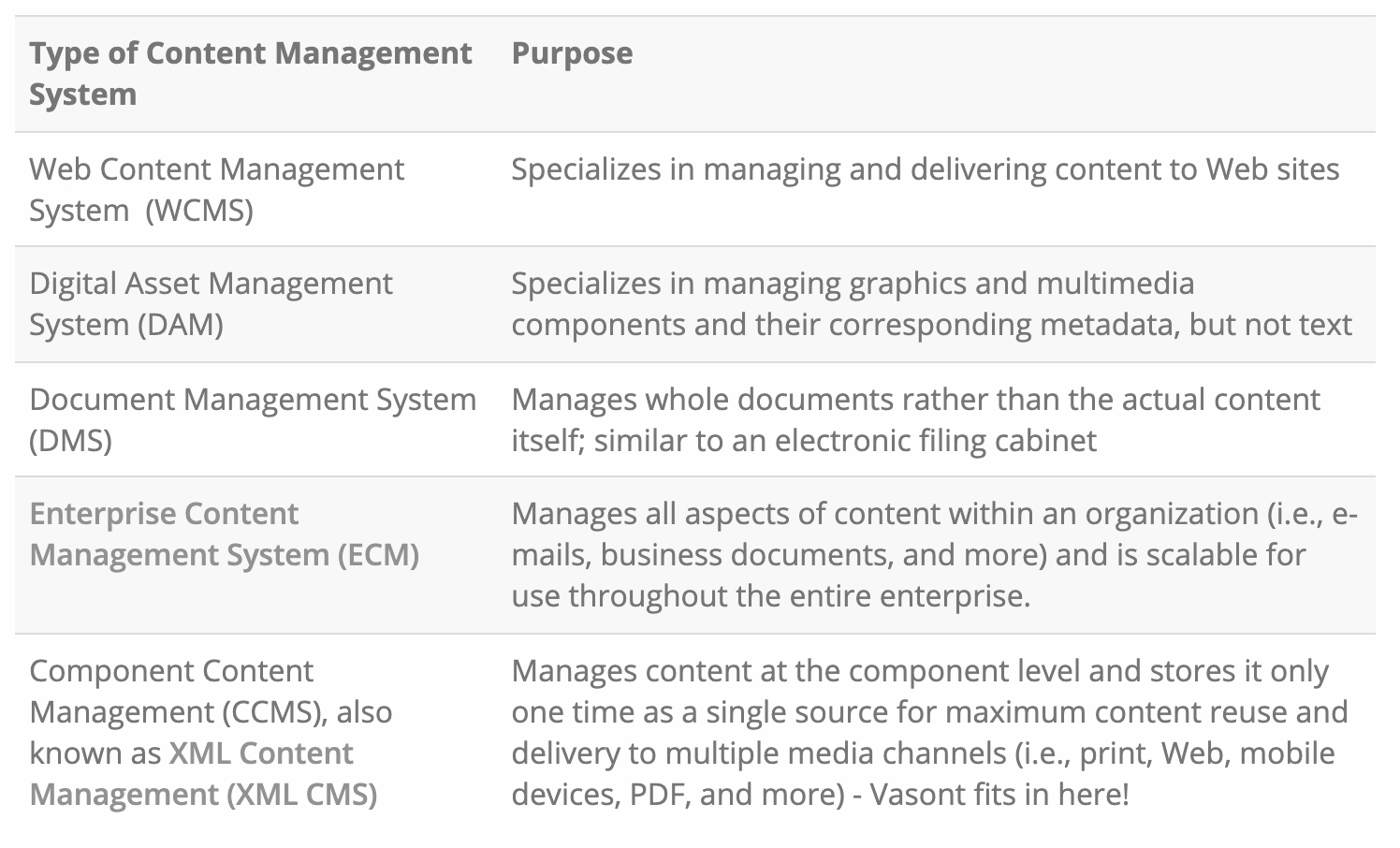
The needs of your organization will determine the best type of content management system for your business. The first step in choosing the right one is to familiarize yourself with the different options available on the market today. Below is a list of the major categories:
Contact us for further information about more in-depth training in content management.
Take this brief survey to determine if a component content management system (CCMS) would benefit your organization:
- Is your content scattered throughout your company, making it hard to find?
- Do you copy and paste the same content repeatedly to many different documents?
- Is it difficult to find all the copies of content when updates must be made?
- Is it hard to determine which content is in draft, revision, and final stages?
- Do you rely on a manual process to cross-reference content?
- Do you have several different versions of the same basic material?
- Does the quality of your content vary across your document set? (e.g., differing terminology, slightly different messaging)
- Do you have an excessive number of calls to your support center?
- Is your content saved in many different formats? (e.g., desktop publishing files, Word files, PDF files)
- Do you have more editorial or publishing work than manpower?
- Do you struggle to manage and track which content needs to be translated?
- Do you translate much of the same content over and over again for different documents?
- Are you paying too much to run your content through translation memory?
- Do you delay new product launches because your documentation isn’t ready?
- Are you using an outdated system to manage your content that creates costly custom programming and causes frequent downtime?
- Does your current software lack support?
- Is your review process inefficient for dispersed SMEs? (e.g., reviewers can't see each other’s feedback, scheduling issues)
- Do you have global content contributors, making it cumbersome to manage across time zones and countries?
- Are you spending time retyping revisions after reviews are conducted?
- Do you have to send out entire documents for review?
- Do you have a hard time tracking your staff’s workload and schedules?
- Do you struggle to find and compile the information you need for reporting the status of your projects?
- Does your content lack security?
- Do you have strict governmental regulations that you must comply with?
If you answered YES to any of these questions, a CCMS will likely provide a solution to your content issues.
Contact us for more information on how the Vasont CMS can improve the content life cycle and its associated costs.
Content is one of the most important assets to your company. The content your company produces sets the impression of your company to the rest of the world, so it should be as accurate and easy to find as possible. If you spend a lot of time sifting through multiple files to find the right content, or you are finding multiple documents that have similar content with discrepancies, then a content management system might be something to consider. A component content management system (CCMS) lets you reuse stored content without having multiple copies of the same content, keeps your content organized, and allows a standardized look throughout all of your documentation.
During the search for a CCMS, you will need to justify the cost and efficiency of the CCMS to your management team. They will want to know how this will benefit the organization as a whole before granting a budget for the new tool. You will need to present a business plan with the value of the CCMS and the return it will provide to the company.
Vasont Systems addressed questions about these topics in two webinars series called “Ask us about…”. Content management experts answered questions submitted by webinar attendees about ROI and the value of content management. These topics are something you will come across in your search for a CCMS, and the experts provided good insight that can help you with your business plan. Please read the following webinar transcripts for more information.
How a ccms can transform a technical writer into an indispensable knowledge broker
The role of a technical writer can sometimes be perceived as a thankless one and the career path as somewhat limited. Although you perform a very important function for your organization by creating and disseminating written communication that represents its face and/or brand, you may view yourself as an employee possessing a skill set that doesn’t transfer easily to other roles. By accepting and even embracing your company’s move to a component content management system, you can increase your value and become a more marketable commodity in the process.
Benefits of the Component Content Management System for Writers
Just as the transition from the typewriter to the word processor and ultimately to the PC revolutionized the way writers of all types perform their jobs, a CCMS can expand your capabilities by leaps and bounds. By becoming an active and enthusiastic participant during the migration to a CCMS, your skills and expertise will prove invaluable in a number of ways:
- Your unique knowledge of content organization is extremely useful in developing content models, potentially leading to roles such as information architect or content strategist.
- Your experience in developing and maintaining templates and stylesheets can aid the process of developing alternative templates in new editors, possibly leading to a role as an XML analyst or stylesheet developer.
- You can play a key role in customizing style guides and process guidelines to the CCMS environment, perhaps being tapped to be a documentation team leader during the implementation phase and eventually parlaying those skills into a project management role.
- Considering that a CCMS eliminates task redundancy, you can put the newly created extra time to good use, focusing on increasing your role and visibility within your organization, thus boosting your chances for advancement.
- If you prefer to remain on a writing path, your exposure to and mastering of the CMS can help you increase the scope of your current role by overseeing large blocks of modular content spanning multiple projects. A CCMS can help you become better and more efficient at your job by being able to deliver more consistent content to your company’s customers and other stakeholders both inside and outside the organization. You may discover that the process of taking on a new challenge will become an invigorating experience that will jumpstart your writing career.
You'll Be Attractive to Other Companies
Even if your current company has limited opportunities for advancement, becoming proficient in a CCMS environment can increase your value on the open market. In addition to having a highly marketable skill set that will increasingly be in demand as more companies migrate to a CCMS, you’ll demonstrate to potential employers that you can be a flexible and adaptable member of their team.
To learn more about how a Vasont CCMS can help you gain even more job skills, contact us today!
CCMS STARTER KIT: START HERE! The tools you need to research and select a component content management system
You have been assigned the task of researching component content management systems for your organization. How do you get started?
Searching the Web is a common starting point, but often an overwhelming one. If you type "content management system" into Google, you will get millions and millions of hits...so now where do you turn? You need a concise CCMS kit to get you started with the basic principles of component content management systems.
Vasont Systems developed this CCMS Starter Kit with tools and checklists to help you plan a component content management strategy, research and select a component content management system, and prepare for its implementation with an effective CCMS implementation plan. Use these tools as a starting point and tailor them to suit your own business needs.
Frequently Asked Questions
DITA, or Darwin Information Typing Architecture, is an XML data model used in the process of information typing to serve such purposes as publishing content through topic-based authoring. In this manner, content is sub-divided into topics like tasks, references, and concepts. Through mapping, these topics are arranged sequentially in the order in which they will be published in any given document. DITA is maintained and defined by the OASIS DITA Technical Committee.
The Extensible Markup Language, or XML, is a markup language with a set of rules for content encoding. XML allows you to tag content in a standardized manner similar to HTML but also enables you to define your own customized tags and determine how these tags should be displayed. As a metalanguage, XML can be used to create a custom language that can be viewed and edited across different types of systems with easy readability by both humans and computers
SaaS stands for Software as a Service. It is a software delivery and licensing model that hosts content on a centralized Internet location, such as a data center in the cloud to be viewed by users over an Internet browser. The software can be accessed on a subscription basis for applications such as content storage and translation management.
A Component Content Management System (CCMS) is a content management database that manages data at a component, or sub-document, level. With the use of XML to provide structured formatting, content is broken up and stored singularly by components such as topic, section, or procedure. This breakdown enables the maximum reuse of material for publishing to multiple media channels, like websites, mobile devices, and print assets.
A CMS is a general service that supports the creation, editing, and repurposing of content at a document level. A CCMS, on the other hand, is software developed to create, store, edit, and manage content at a modular level, and it focuses more on the small details of your content rather than on the files themselves.

Our Blogs


Ask a Question
Fill out the form, and we’ll get back to you within 24 hours!